DRIVING
Using the driving support systemsDriving mode select switch
The driving modes can be selected to suit the driving and usage conditions.
Selecting a driving mode
Repeatedly press the switch until the system changes to the intended driving mode.Each time the switch is pressed, the driving mode changes in the following order and the Power mode and Eco drive mode indicators turn on or off accordingly.
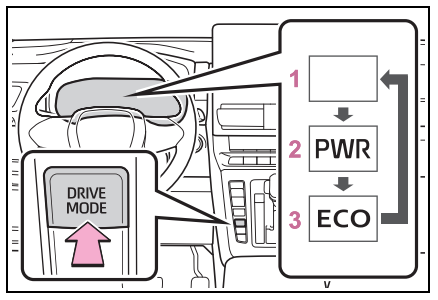
- Normal mode
Provides an optimal balance of fuel economy, quietness, and dynamic performance. Suitable for normal driving. - Power mode
Controls the hybrid system to provide quick, powerful acceleration. When Power mode is selected, Power mode indicator comes on. - Eco drive mode
Helps the driver accelerate in an ecofriendly manner and improve fuel economy through moderate throttle chteristics and by controlling the operation of the air conditioning system (heating/cooling).
When Eco drive mode is selected, Eco drive mode indicator comes on.
∎ When changing to a driving mode other than normal mode
The background color of the multi-information display changes according to the selected driving mode.∎ Operation of the air conditioning system in Eco drive mode
Eco drive mode controls the heating/cooling operations and fan speed of the air conditioning system to enhance fuel efficiency. To improve air conditioning performance, perform the following operations:- Adjust the fan speed(Click Here),(Click Here)
- Turn off Eco drive mode
∎ Automatic deactivation of a driving mode
- Power mode is automatically deactivated and the driving mode returns to normal mode when the power switch is turned to OFF.
- Normal mode and Eco drive mode are not deactivated until another driving mode is selected. (Even if the power switch is turned to OFF, normal mode and Eco drive mode will not be automatically deactivate.)